Have you ever forgotten a password right when you needed it most? Or reused the same password across multiple sites, knowing it’s risky but doing it anyway? You’re not alone. In today’s digital world, managing dozens of logins is overwhelming. That’s why many people turn to password managers—and this 1Password review explores whether it’s truly worth your time and money.
This detailed guide is written for consumers, online buyers, B2B buyers, and even poor researchers who want a clear, friendly explanation without technical jargon. By the end, you’ll know exactly where 1Password shines, where it falls short, and whether it fits your needs.
What Is 1Password?
At its core, 1Password is a premium password manager designed to store, generate, and autofill strong passwords across your devices. Instead of remembering dozens of logins, you only remember one master password.
In this 1Password review, it’s important to note that the tool goes beyond simple password storage. It acts as a digital vault where you can securely keep login credentials, credit card details, secure notes, and even sensitive business data.
Who Is 1Password For?
1Password appeals to a wide range of users:
Consumers who want better online security
Online buyers managing multiple shopping accounts
B2B buyers looking for secure team access
Poor researchers who want a simple, reliable solution
Its flexibility is one of the reasons 1Password often ranks among the best password managers globally.
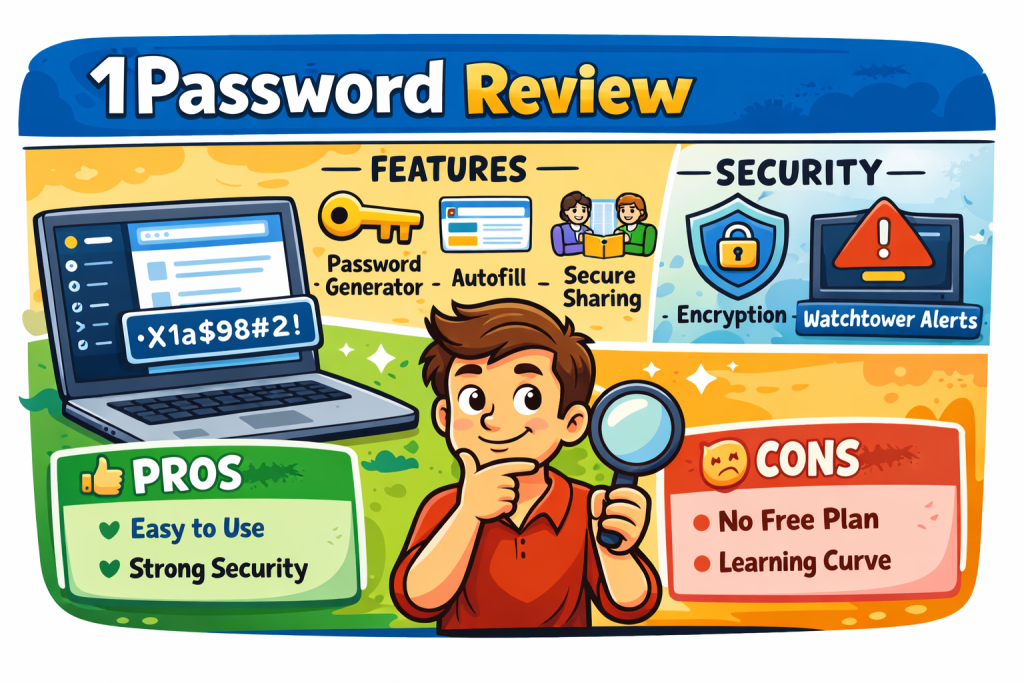
Key Features of 1Password
When evaluating any password manager, features matter. This section of our 1Password review breaks down the most important tools you’ll actually use.
Secure Password Vault
1Password stores all your data in an encrypted vault. Only you can access it using your master password. Not even 1Password can see what’s inside.
Password Generator
Creating strong, unique passwords is effortless. You can customize length, symbols, and numbers to match site requirements.
Autofill Across Devices
1Password works seamlessly across desktops, tablets, and smartphones. Logins autofill instantly, saving time and reducing errors.
Watchtower Security Alerts
One standout feature highlighted in every serious 1Password review is Watchtower. It monitors data breaches and weak passwords, alerting you if your security is at risk.
Secure Sharing
You can safely share passwords with family members or team colleagues without revealing the actual password.
1Password Security: How Safe Is It?
Security is the heart of any password manager. In this 1Password review, security is one of its strongest selling points.
1Password uses end-to-end encryption, which means your data is encrypted on your device before it’s ever stored. Your master password never leaves your device.
Key Security Highlights
Zero-knowledge architecture
Two-factor authentication support
Encrypted vaults for individuals and teams
Protection against phishing attempts
With cyber threats constantly evolving, strong encryption and proactive monitoring align with current security trends worldwide.
Ease of Use and User Experience
A powerful tool means nothing if it’s hard to use. Thankfully, 1Password balances security with simplicity.
The interface is clean and intuitive. Even first-time users can navigate the app without confusion. This is especially helpful for poor researchers or non-technical users.
Setup Process
Install the app or browser extension
Create your master password
Import existing passwords (optional)
Start browsing securely
This smooth onboarding process is a recurring highlight in many 1Password review articles.
1Password Pricing and Plans
Pricing plays a major role in buying decisions, especially for consumers and B2B buyers.
Personal and Family Plans
Personal plans are ideal for individuals, while family plans allow multiple users with shared vaults and recovery options.
Business and Team Plans
For businesses, 1Password offers advanced admin controls, role-based access, and secure collaboration tools.
While 1Password is not free, its pricing reflects its premium security and feature set. Compared to free password managers, you get stronger protection and better long-term value.
Pros and Cons of 1Password
No 1Password review is complete without a balanced look at the good and the not-so-good.
Pros
Excellent security architecture
User-friendly design
Strong password generation tools
Great for individuals and businesses
Reliable customer support
Cons
No permanent free plan
Slight learning curve for advanced features
Despite minor drawbacks, 1Password remains one of the most trusted names in the password manager space.
1Password vs Other Password Managers
How does 1Password compare to other tools claiming to be the best password manager?
Compared to free options, 1Password offers superior security and better breach monitoring. Against other premium tools, it stands out for usability, cross-platform support, and strong business features.
If you value long-term security over short-term savings, this 1Password review suggests it’s a smart investment.
Current Trends in Password Management
Password management is evolving fast. One key trend is the growing focus on zero-trust security and passwordless authentication.
1Password is adapting by improving integration with passkeys and enhancing breach detection tools. Another trend is increased demand from remote teams, and 1Password’s business features fit perfectly into this global shift.
Actionable Tips to Get the Most Out of 1Password
To maximize value, follow these practical tips:
Enable two-factor authentication immediately
Replace weak passwords using Watchtower alerts
Use the password generator for every new account
Organize vaults by personal and work use
Regularly review security reports
These steps turn 1Password from a simple tool into a powerful security ally.
Is 1Password Worth It?
So, is 1Password worth your money? Based on this 1Password review, the answer is yes—for most users.
If you care about security, convenience, and peace of mind, 1Password delivers consistent value. It’s especially beneficial for people managing many accounts or teams handling sensitive data.
Frequently Asked Questions (FAQ)
1. Is 1Password better than free password managers?
Yes. This 1Password review shows that paid tools like 1Password offer stronger encryption, breach monitoring, and support compared to free options.
2. Can beginners use 1Password easily?
Absolutely. The interface is friendly, and setup is simple, even for non-technical users.
3. Does 1Password work on all devices?
Yes. It supports major operating systems and browsers, making it ideal for global users.
4. Is 1Password good for businesses?
Yes. Business plans include admin controls, secure sharing, and team management features.
5. What happens if I forget my master password?
Due to its zero-knowledge design, recovery options depend on your setup. Family and business plans offer recovery assistance.
Final Verdict and Call to Action
Managing passwords doesn’t have to be stressful or risky. This in-depth 1Password review shows why it’s trusted by millions worldwide. From strong security to ease of use, it checks nearly every box.
👉 Ready to take control of your online security? Try 1Password today and experience safer, simpler digital life with confidence.
Related posts:
 Temu Reviews 2026: What Real Users Say About Prices, Quality & Safety
  Wise Loan Reviews 2026: A Friendly and Honest Guide for Global Borrowers
  Wirecutter Reviews in 2026: A Friendly Guide for Smart Global Shoppers
  1-800-GOT-JUNK Reviews: Honest Insights Before You Book
  2 Burner Gas Grill Reviews: Honest Comparisons, Features & Smart Buying Tips
  A Good Example Review for Tree Company: A Complete Guide for Trust & Growth
  A-Premium Reviews: An Honest, In-Depth Guide for Smart Buyers
  AAA Auto Insurance Reviews: Is AAA Worth It for Drivers?
  ABC Mouse Reviews: Is It Worth It for Early Childhood Learning?

Thank you for your sharing. I am worried that I lack creative ideas. It is your article that makes me full of hope. Thank you. But, I have a question, can you help me? https://accounts.binance.info/uk-UA/register?ref=XZNNWTW7
Thanks for sharing. I read many of your blog posts, cool, your blog is very good.